Face Social Preference (FSP)
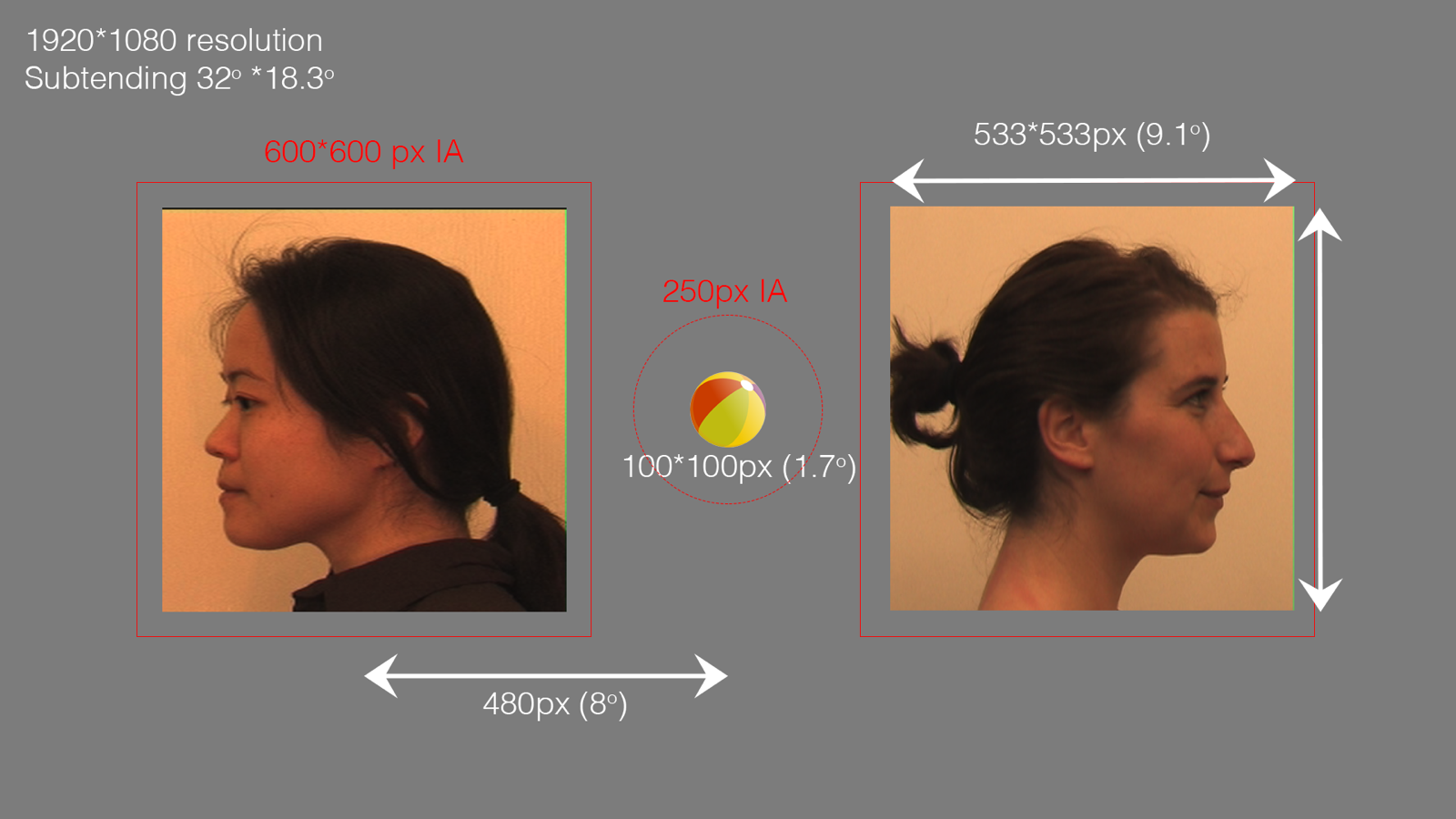
Fig. 5 FSP and interest area placement and sizing.
Overview
The FSP task is an eye-tracking task to test social orienting and decreased social motivation
with regards to gaze. Each trial in this gaze-contingent task begins with a 100*100px ball
animation. Once gaze is within the ball’s interest area (IA), two still images of faces (or a
in one condition a toy) are displayed oriented away from screen center (as shown in Fig. 5 )
The images and the resulting video are sized to 533*533px``and are displayed centrally within
the left or right half of the screen (an eccentricity from center of ``480px).
Conditions
- Away vs Towards (AT)
Videos of caregivers facing away vs towards
- Invariant vs Variant (IV)
Videos of caregivers saying “hello”/”good job” (variant) vs smiles (invariant).
- Face vs Toy
Shown videos of a caregiver’s faces vs videos of toys.
Interest Areas
There are three interest areas regions for the experiment. The 250px ellipse
surrounding the ball and the left and right rectangular 600*600px regions around
each image/video. The name of each interest area changes based on behavior, e.g.
if the right video is a ‘variant’ stimuli and the right variant side is triggered to
play, the IA for that side is labelled “Variant_Video_IA” and the non-video side is
labeled Invariant_Still_IA. This labelling is to make clear which IA side and
condition was showing video, and which was a still image. This labelling could aid
analysis and dwell time measures.
Gaze Triggers
Each trial begins with the ball animation which rotates until gaze is detected to the ball
IA region by an invisible boundary (IB) trigger. This trigger has a minimum duration set to
100ms. Gaze must be continuously within the ball IA region for 100ms for the trigger
to fire. Once this trigger fires, the stimuli as still images are shown (Fig. 5).
For trials that do not have a fixed choice video side, there are IB triggers that will fire
if gaze is held within the still image IA for 100ms (minimum duration). The triggered
side will then show the corresponding video (after a prespecified delay).
Classifiers
There is no built-in classifier for this task as the interest area analysis and eye movement or
behavior of interest to the videos will need to be deduced/coded after data collection. There is,
however, clear labelling of which side was triggered by gaze. There is also an initial look RT
measure which provides an RT value for the first sample of gaze detected to the still image that
triggers the video (after 100ms).
Animations
The only animation is the 100*100px ball which rotates clockwise at 1Hz.
Event Messaging
Each trial begins with the message BALL_ANIMATION_ONSET and is followed by
GAZE_TRIGGER_TO_BALL when gaze triggers the IB, or after 2500ms without
a gaze trigger the message TIMEOUT_FALSE_START is written. Following the
gaze-trigger the message STILL_IMAGE_ONSET signifies the onset of the still
images. Gaze triggering the left video writes the message GAZE_TRIGGER_LEFT,
and the right trigger GAZE_TRIGGER_RIGHT. If the video presentation side is
fixed by the data source, the message FIXED_SIDE is written. Once the video
begins, there is a message for each frame of the video, e.g. ‘RIGHT VIDEO FRAME 1’
with a numeric value showing the currently displayed frame. This was included to
allow a simpler frame level interest area values to be matched up if required. If
not gaze triggers a stimulus within 5000ms TIMEOUT_NO_GAZE is written and
the trial is recycled. The trial ends with the message DISPLAY_BLANK when the
final blank screen is displayed.
Event Marker |
Away-Towards vs Towards-Away |
Face vs Toy |
Invariant vs Variant |
EGI DIN |
EYELINK DIN |
|||
|---|---|---|---|---|---|---|---|---|
Looked-Away |
Looked-Towards |
Face |
Toy |
Invariant |
Variant |
|||
BALL_ANIMATION_ONSET |
dafp |
DIN3 |
4 |
|||||
GAZE_TRIGGER_TO_BALL |
gafp |
|||||||
TIMEOUT_FALSE_START |
||||||||
STILL_IMAGE_ONSET |
dsfp |
DIN2 |
2 |
|||||
GAZE_TRIGGER_LEFT |
glfp |
|||||||
vlta |
vlat |
vlft |
vltf |
vliv |
vlvi |
DIN3 |
4 |
|
GAZE_TRIGGER_RIGHT |
grfp |
|||||||
vrta |
vrat |
vrft |
vrtf |
vriv |
vrvi |
DIN3 |
||
FIXED_SIDE |
vlta / vrta |
vlat / vrat |
vlft/vrft |
vltf/vrtf |
vliv/vriv |
vlvi/vrvi |
DIN3 |
|
TIMEOUT_NO_GAZE |
||||||||
DISPLAY_BLANK |
blfp, brfp |
|||||||
In addition to the event codes above, the following codes are also sent to the EGI Netstation acquisition system, but generally are not needed for offline analysis:
Description |
EGI Event |
Begin trial |
|
begin task |
|
Netstation misc event |
|
display start menu |
|
display break menu |
|
display end screen |
|
display attention screen |
|
display blank screen |
|
Gaze at left video |
|
Gaze at right video |
|
Display Blank Left |
|
Display Blank Right |
|
Understanding the EGI event codes
In the EGI event codes, the first letter indicates the type of event, and the
remaining letters indicate the event. For example, vlta indicates display
video left, looking towards to away. vlat stands for display video left, looking
away to towards the participant.