Gap Overlap (GO)
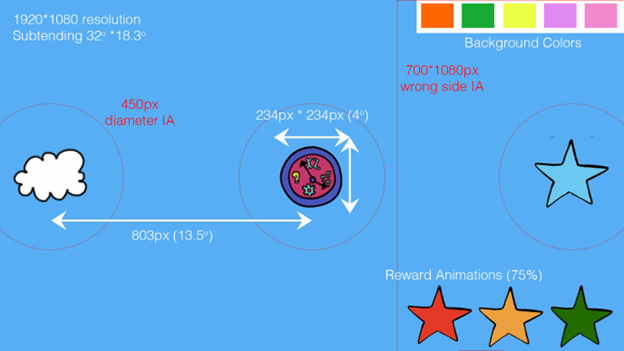
Fig. 3 Gap-Overlap stimuli and interest area placement and sizing.
Overview
The Gap Overlap task measures reaction times from a central stimulus to a peripheral
stimulus. A central stimulus is first presented (spinning clock), followed by a
peripheral stimulus (Cloud), either 803px eccentricity to the left or right. After
the participant gazes to the peripheral stimulus (or if the trial times-out), A reward
animation (star) is presented at the same place as the peripheral stimulus. Sounds are
played when the central and peripheral stimuli are presented. The color of the
background screen is randomly selected before the session begins, and remains the same
for all trials.
Conditions
- Baseline condition
the central fixation disappears simultaneously with the presentation of the peripheral stimulus
- Gap condition
the central fixation disappears 200 ms before the presentation of the peripheral stimulus
- Overlap condition
the central fixation disappears 200 ms after the presentation of the peripheral stimulus
Interest Areas
The Central, Peripheral and Reward stimuli all have corresponding interest area (IA)
regions: Non-overlapping elliptical resources with a diameter of 450px,
shown as red circles in Fig. 3. This produces a 108px buffer around the
stimulus. There is also a 700*1080px IA that detects gaze to the wrong side of the
screen (shown in Fig. 3). This informs the trial classifier, as gaze to the
wrong side of the screen invalidates the trial.
Gaze Triggers
Gaze behaviors are classified by low-latency Invisible boundary (IB) gaze triggers,
that fire near immediately after gaze is detected within the IA. To begin a trial, the
participant’s gaze must stay within the 450px diameter IA around the Central
stimulus for 500ms. The IB trigger for the ‘wrong side’ of the screen IA will fire
immediately if any gaze is allocated within that IA. Gaze must be within the Peripheral
Stimulus IA region for 50ms to trigger this IB. This small delay in firing makes
sure that gaze is kept within the target IA before it is classified as such.
Note
The Saccadic RT from the central to peripheral stimuli is calculated using the
first gaze sample within peripheral stimulus IA, not first gaze sample that
meets the 50ms threshold.
Classifiers
To aid the researchers running the study with real-time information, classifiers in the experiment check for certain behaviors required for a valid trial. A trial is deemed valid if:
The saccade RT value is less than
1200ms.The saccade RT is greater than the
100ms.There was is gaze to the wrong side of the screen.
Valid trials are added to a count to the valid sum for that type of trial shown on the
Eyelink Host PC ("Gap", "Overlap", and "Baseline").
Animations
- Central Stimulus (CS)
At the onset of a trial the Central Stimulus is
0*0pxand over300msincreases in size to350*350px(looming). Following this the Central Stimulus pulses, increasing/decreasing between234*234pxto350*350pxat 3Hz (throbbing). Once gaze is detected, the Central Stimulus sized234*234pxspins clockwise at 1.5Hz.- Peripheral Stimulus (PS)
Following the onset of the Peripheral Stimulus, gaze to it triggers a rotation animation. The Peripheral stimulus sized at
234*234pxrotates clockwise at 1.5Hz. Finally,- Reward Stimulus (RS)
the reward animation starts at
234*234px, reduces to0pxas it rotates clockwise at 1.5Hz over 1 second (the reward duration).
Event Messaging
Because the task is designed to be run on both the Eyelink and EGI acquisition systems, Experiment Builder will send experiment messages to both systems. The messages sent to the Eyelink Host PC and to the EGI Netstation acquisition will differ slightly.
Eyelink Acquisition
Throughout the recording sequence of the trial, messages are sent to the Eyelink Host
PC to mark key onsets, and are written to the Eyelink EDF file. The trial begins
with a message "CS_ONSET" when the CS begins to loom. When gaze is
detected to the CS a message "GAZE_TO_CS" is written, directly followed by
"CS_SPIN" when the CS beings spinning for the 600ms (+ jitter value). This is
followed by "ONSET_200MS" to signify the 200ms period when the CS either
remained or left the screen, and then "ONSET_PS" when the PS is displayed. If gaze
is oriented to the wrong side, a message "GAZE_TO_WRONG_SIDE" is written, if gaze is
to the PS, then "GAZE_TO_PS" is written, followed by "REWARD_ONSET" when the
reward begins. The trial ends with a "DISPLAY_BLANK" message.
EGI acquisition
EGI Netstation does not support the same event messaging as the Eyelink Host PC, as event codes are generally restricted to 4 characters. The table below shows the corresponding event codes for the EGI Netstation acquisition, and the DIN event triggered by the photo-diode on the screen for each event.
Eyelink Event |
EGI Event |
DIN EGI |
DIN EYELINK |
||
|---|---|---|---|---|---|
Condition |
Overlap |
Gap |
Baseline |
||
|
dfoc |
dfbc |
dfgc |
DIN2 |
2 |
|
gfoc |
gfbc |
gfgc |
||
|
dsoc |
dsbc |
Dsgc |
DIN3 |
4 |
|
dtoc |
dtbc |
dtgc |
DIN2 |
2 |
|
gcoc |
gcbc |
gcgc |
||
|
geoc |
gebc |
gegc |
||
|
droc |
drbc |
drgc |
DIN3 |
4 |
|
dboc |
dbbc |
dbgc |
||